Write without the clutter.
A lightweight app with a bundled editor and PDF viewer. No separate web server, Rust or Node.js setup. Write with tabs and autosave, then Compile with one button.
 GitLeaf
Free & open source · Mac, Windows & Linux
Write papers on your own computer, with Git history
and a PDF preview beside your source. No account or subscription needed.
Offline compilation needs cached or installed LaTeX packages. Prepare for offline writing.
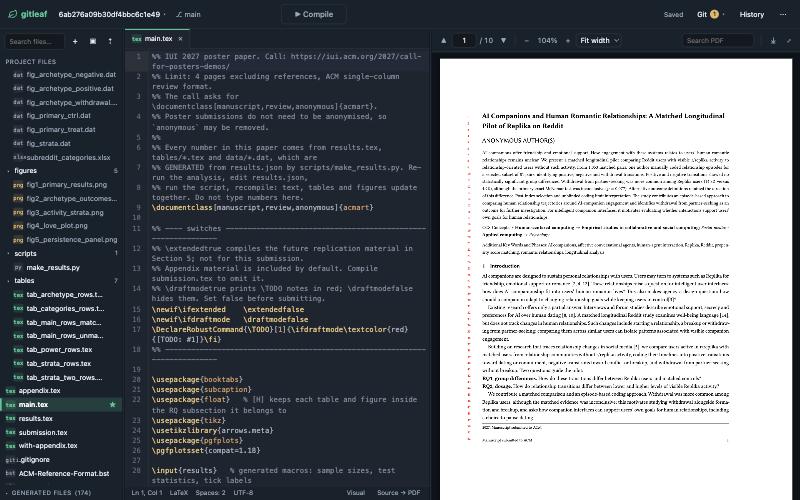
A lightweight app with a bundled editor and PDF viewer. No separate web server, Rust or Node.js setup. Write with tabs and autosave, then Compile with one button.
Every project is a plain Git repository on your computer. Commit milestones, review history and push to GitHub or another remote when you choose.
Edit, autosave and commit locally without internet. Compile with cached Tectonic packages or an installed MacTeX or TeX Live distribution.
Start writing
Published release: v0.3.3. Install Git first, then follow the setup guide.
This release provides standalone executables. Mac app / DMG packaging is in the source and will appear here once published in a release.
GitLeaf opens in your browser and runs locally. The Mac app requires macOS 13+. Mac downloads are not yet notarized and may need first-launch approval. Setup help · All assets & checksums
Write wherever you are
Your files, editor, PDF viewer and local Git history stay available without a connection.
Download GitLeaf, install Git, then install Tectonic or a full LaTeX distribution with latexmk.
Include its bibliography and figures. Tectonic downloads and caches needed packages; full LaTeX uses packages installed on your computer.
Try compiling that paper without internet. New packages may still need a download; remote Git operations, online templates and updates need a connection.
From download to PDF
Download for your computer. GitLeaf starts a local server and opens the editor in your browser.
Choose a built-in article template, import a source ZIP, or clone a Git repository.
If you need a compiler, accept the Tectonic installation prompt. Your PDF appears beside your writing.
A few useful details
GitLeaf offers a similar source-and-PDF workflow on your computer. Import an Overleaf source ZIP, or use Overleaf’s Git bridge if your account supports it. Collaboration uses Git; live simultaneous editing is not included.
Yes. GitLeaf is free and open source under the MIT license. Local writing needs no account or subscription. Optional third-party services such as Overleaf’s Git bridge have their own access requirements.
You need Git, but you can start without a LaTeX installation. On your first Compile, GitLeaf offers to install Tectonic if no compiler is found. You can also install MacTeX or TeX Live with latexmk. See compiler options.
The editor and your local files work offline. Tectonic needs internet to fetch packages it has not cached. A full LaTeX installation can compile using its installed packages offline. Downloads and remote Git operations need internet. Follow the offline setup checklist.
The setup and reference guide comes from the GitHub README. It includes compiler choices, troubleshooting, configuration and source builds.